Designing a Branded Email Campaign with Mailchimp
Created a responsive, branded Mailchimp campaign for Homework Helpers’ fall semester enrollment. Integrated logo, images, and email copy while customizing layout, colors, and CTAs for audience engagement.
Project Type
Email Marketing | Campaign Design | Brand Integration
Date
July 2025

Project Overview
As a member of the marketing team for Homework Helpers, a tutoring business offering both online and in-person educational services, I was responsible for designing a fall semester sign-up email campaign using Mailchimp. This project required me to create a visually engaging email that reflected the brand's personality and attributes, ensuring consistency with the company's logo, colors, and tone of voice.
Mailchimp Setup
-
Logged into Mailchimp and launched the campaign titled “Homework Helpers Fall Campaign.”
-
Personalized recipient fields for a warm, first-name-based salutation.
.png)
Editing Sender Information
-
Edited sender info to display Homework Helpers as the sender.
-
Entered the subject line and preview text from the draft to ensure brand-aligned messaging.
.png)
Adding Subject Line and Preview Text
-
Copied the subject line and preview text from the draft email into the relevant fields in Mailchimp and saved the changes.
.png)
Email Design in Mailchimp
-
Used the New Email Builder for design flexibility.
-
Replaced the default logo with a custom image block, uploaded via URL with appropriate alt text for accessibility.
-
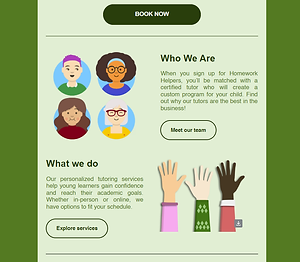
Added a provided visual (either tutors’ graphic or children’s hands raised), adjusting size and layout for visual balance.
.png)
.png)
.png)
Formatting the Email
-
Used Mailchimp’s content blocks to organize copy: heading, subheadings, body text, and call-to-action button.
-
Matched fonts, colors, and button styles to Homework Helpers’ brand palette, ensuring visual consistency.
-
Customized canvas background and button colors to boost contrast and readability.
Testing and Optimization
-
Previewed on both desktop and mobile for responsiveness.
-
Sent a test email to self to validate inbox appearance and formatting.
-
Finalized and saved the layout as a reusable template for future campaigns.
.png)
Key Takeaways
This project taught me how to effectively use Mailchimp’s email builder to create brand-aligned email campaigns. I developed a deeper understanding of how to integrate branding elements like logos and colors into email layouts, ensuring visual and tonal consistency. Additionally, I learned to manage email personalization and test for responsive design across devices. Overall, this experience improved my email marketing and design skills, equipping me to handle future email campaign projects with confidence.